

“Buffering ruins the mood faster than a spoiler.”
If you’ve ever sat down to watch a movie or a big game in glorious 4K, only to be met with spinning wheels and choppy playback, you know the pain. IPTV in 4K streaming isn’t just about having a good IPTV provider—it’s also about having the right internet speed.
So how fast does your internet need to be for buttery-smooth IPTV 4K?
In this guide, I’ll break it all down in plain language from the basics of what affects your IPTV stream, to expert-backed data on required speeds, and even my own experience streaming with a 100 Mbps connection .
Table of Contents
Why Internet Speed Matters for IPTV (Especially 4K)
When it comes to IPTV, speed isn’t everything but it’s a big deal.
4K content (also called Ultra HD) uses more than 4 times the data of regular HD. That means if your internet is too slow or unstable, you’ll get buffering, lag or complete stream failures.
According to a report by Statista, 12% of global internet users still have average download speeds under 25 Mbps. That’s enough for YouTube in HD—but not reliable 4K streaming
What Makes IPTV Different from Other Platforms?
IPTV streams don’t buffer large portions ahead of time. They work more like a live cable feed, just over the internet a completely different delivery method compared to IPTV vs cable, where traditional broadcast uses fixed transmission while IPTV depends on your network’s real-time performance. If your connection can’t keep up moment-to-moment, your viewing experience suffers instantly.
How Much Speed Do You Really Need for 4K Streaming?
Let’s get to the numbers.
| Streaming Quality | Recommended Speed | Ideal for IPTV? |
|---|---|---|
| SD (480p) | 6–10 Mbps | ✅ |
| HD (720p–1080p) | 10–25 Mbps | ✅ |
| 4K Ultra HD (2160p) | 25–50 Mbps | ✅ with stability |
| Multiple 4K Streams | 50–100+ Mbps | ✅ Best choice |
💡 Pro Tip: Your ISP might advertise 100 Mbps, but that’s not always what you get. Speeds can dip during peak hours. Use a site like Speedtest.net to check your actual performance.
My Setup: Real Experience with 4K Streaming IPTV on 100 Mbps
I’ve been using 4K IPTV in the U.S. for over a year and my internet plan is 100 Mbps download / 10 Mbps upload. Here’s what I’ve learned:
- Single 4K stream? Smooth 95% of the time.
- Watching on 2 devices at once in 4K? Still smooth, unless someone’s uploading files.
- Wi-Fi vs Ethernet? I use a wired connection for my Firestick and that made a noticeable difference in stability.
- VPN usage? Slight speed drop, but good VPNs like NordVPN or ExpressVPN are still IPTV-friendly.
So yes—100 Mbps is more than enough for most U.S. IPTV users, as long as your signal is stable and you’re not sharing the network with heavy downloads or multiple 4K users.
Factors That Affect 4K Streaming Performance (Besides Speed)
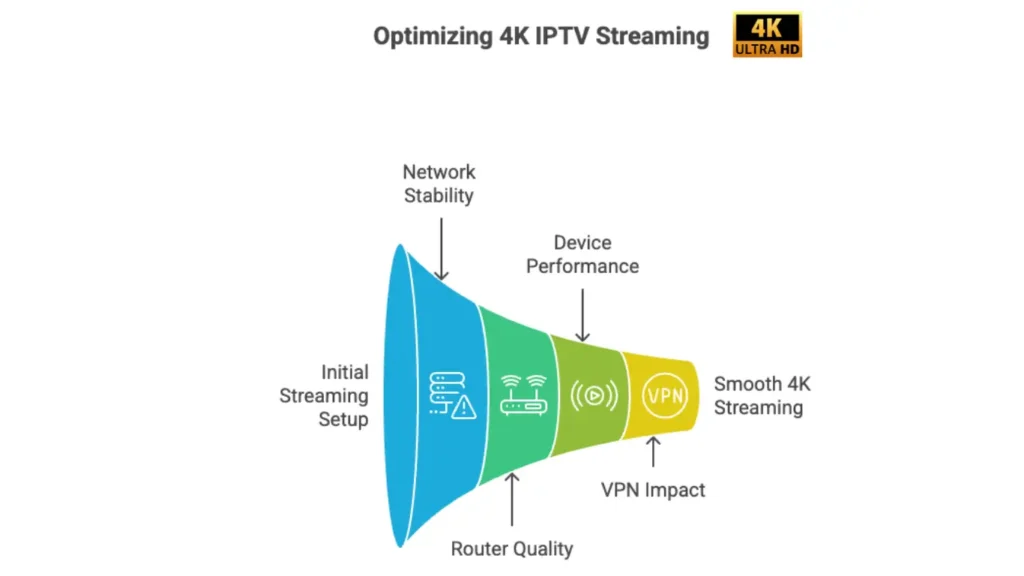
Speed is only one part of the equation. Smooth 4K streaming also depends on having the right equipment, including a 4K-compatible device, a stable network connection, and the proper HDMI cable. If you’re building a complete setup, check out our guide on what equipment is needed for 4K IPTV.
1. Network Stability
Constant fluctuations (even on fast connections) cause stream drops. According to Ookla’s U.S. Internet Performance Report, latency spikes and jitter are common on cheaper ISPs during peak hours.
Solution: Use a wired connection or upgrade your router to minimize instability.
2. Router Quality
Your old router might be the reason your IPTV freezes. Cheap or outdated routers struggle with 4K throughput.
Solution: Upgrade to a dual-band or Wi-Fi 6 router.
3. Device Performance
Using IPTV on low-end Android boxes? You’ll struggle. A weak processor can’t handle decoding 4K smoothly.
Solution: Use a well-reviewed IPTV device like Firestick 4K Max, Nvidia Shield, or a high-quality Android box.
4. VPN Impact
Many IPTV users in the U.S. use VPNs to access content or stay private. VPNs encrypt your data, but also slow things down a bit.
Solution: Choose a fast VPN provider like (NordVPN) and connect to a nearby server.
What Experts Recommend
Experts agree—speed isn’t everything, but for 4K, it’s the foundation.
- YouTube recommends between 20–50 Mbps for 4K, depending on bitrate and frame rate.
- IPTV services are less optimized than big streaming platforms. They often need 30–40 Mbps per stream for reliable performance.
A structured guide to 4K IPTV streaming, device requirements, and the best setup conditions can make performance differences much easier to understand.
How to Test Your Internet Before Subscribing to 4K Service
Don’t wait until your subscription is active. Test it beforehand using these quick steps:
- Go to fast.com or speedtest.net
- Run the test at the time you usually watch (evenings? weekends?)
- Write down:
- Download speed
- Upload speed
- Latency (ping)
- Jitter
Ideal for 4K Streaming:
- Download: 50+ Mbps
- Upload: 5+ Mbps
- Latency: Under 30ms
- Jitter: Under 10ms
If you don’t hit these numbers, you may need to adjust expectations or contact your ISP.
4K Streaming on Different Devices – Does Speed Requirement Change?
| Device Type | 4K Compatibility | Internet Requirement |
|---|---|---|
| Smart TV (Newer) | ✅ Yes | 25–40 Mbps |
| Firestick 4K Max | ✅ Yes | 30–50 Mbps recommended |
| Android TV Box | ✅ Yes | 25+ Mbps, good decoding |
| iPhone/iPad | ✅ Yes | 20–40 Mbps (varies) |
| Laptop/Desktop | ✅ Yes | 25–50 Mbps |
📌 Note: Ethernet is always more stable than Wi-Fi, especially for 4K.
Common IPTV Speed Myths (Debunked)
Let’s clear up some confusion:
“I have 10 Mbps, that’s enough for 4K Streaming”
Not even close. That might work for SD or some 720p content—definitely not 4K.
“Wi-Fi 5GHz is always better.”
Not if the signal is weak or your router is far away. 5GHz has higher speeds but lower range.
“Buffering is always the IPTV provider’s fault.”
Not necessarily. In many cases, buffering can be caused by device issues, Wi-Fi interference, ISP congestion, or even excessive cached data on your Firestick. If your apps feel slow or unresponsive, try clearing the cache on your device before assuming the problem is server-related.
Should You Upgrade Your Internet Plan?
Here’s a quick checklist. If you say “yes” to 2 or more, consider upgrading.
- Do you watch IPTV in 4K regularly?
- Do you have 3 or more people streaming at the same time?
- Do you use a VPN while streaming?
- Do you experience buffering during prime hours?
- Is your download speed under 50 Mbps?
If you’re serious about smooth streaming, especially with multiple users or devices, 100 Mbps is a safe zone and it’s one of the key things that helps create a smoother 4K streaming experience.
Summary: Get the Best 4K Quality Experience
Let’s wrap this up:
✔️ Minimum speed for 4K Streaming : 25 Mbps
✔️ Recommended for best performance: 50–100 Mbps
✔️ My experience: 100 Mbps is more than enough for 2 streams + VPN
✔️ Other tips:
- Use Ethernet when possible
- Invest in a solid IPTV box
- Get a quality router
- Choose a fast VPN if needed
Still Not Sure What Plan to Choose?
Start by checking your actual internet speed at Speedtest.net, then compare with your IPTV habits. If your goal is smooth 4K streaming with no buffering—even on weekends—stick to 50 Mbps or higher. If you’ve got family watching at the same time, go for 100 Mbps or more.
And if you’re hunting for a reliable IPTV provider in the U.S., I personally use Stella IPTV and it works perfectly on my setup.
