

Have you ever started a movie in “4K” and wondered why it doesn’t actually look any better than HD?
I’ve been there. The picture says 4K… but the experience feels far from it.
That’s the frustrating part about Ultra HD streaming: the label alone doesn’t guarantee anything.
Real Ultra HD streaming depends on the right equipment working together your screen, your device, your connection, and even your cables.
In this guide, I’ll walk you through everything you truly need for smooth, stable 4K streaming, based on what actually works in real homes for real users.
Table of Contents
The Real Problem With 4K
Many people sign up for 4K channels and still get:
- buffering
- washed-out colors
- motion blur during sports
- random quality drops
stable 4K streaming requires at least 50 Mbps per stream and compatible hardware for HEVC decoding
HDMI.org confirms that without the proper HDMI version, your screen may downscale the signal even if the source is 4K
(HDMI Licensing Administrator).
So the issue isn’t just the stream it’s the setup.
Core Equipment Needed for 4K
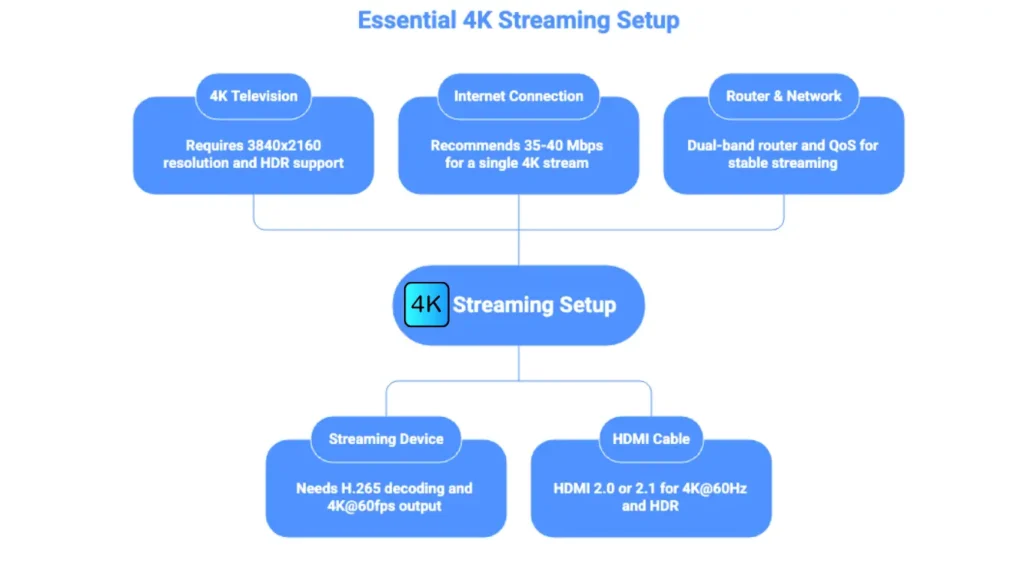
1. A True 4K Television
Not all “4K” TVs are equal.
You need:
- Resolution: 3840 × 2160
- Support for HDR10 or Dolby Vision
- Native 60Hz refresh rate (120Hz for premium sports viewing)
Manufacturers like LG, Samsung, and Sony list these specs clearly on product pages.
2. A 4K-Capable Streaming Device
Your IPTV box does most of the heavy work.
The best performing options in 2026:
| Device | Why It Works Well |
|---|---|
| Fire TV Stick 4K Max | Strong processor, great codec support |
| NVIDIA Shield TV | Top performance, long-term updates |
| Formuler Z11 Pro | Built specifically for IPTV |
| High-end Android Box | Flexible app support |
| Chromecast with Google TV | Affordable, easy setup, supports popular IPTV apps |
Chromecast is a popular option for beginners. Learn how to watch IPTV on Chromecast for a complete setup guide.
Your device must support:
- H.265 (HEVC) video decoding
- 4K output at 60fps
- 5GHz Wi-Fi or Ethernet
Without HEVC support, 4K streams won’t stay stable.
This is confirmed by MPEG’s official codec documentation.
3. Internet Connection That Can Actually Handle 4K
Real-world numbers that work smoothly:
| Usage | Recommended Speed |
|---|---|
| Single 4K stream | 35–40 Mbps |
| Two 4K streams | 70–80 Mbps |
| Whole household | 100+ Mbps |
If you’d like to go a bit deeper, check our guide on what internet speed you need for 4K streaming.
4. The Right HDMI Cable (This One Gets Overlooked)
Many problems come from old HDMI cables.
You need:
- HDMI 2.0 minimum for 4K@60Hz
- HDMI 2.1 for HDR + high refresh rate
Cheap cables cause:
- flickering
- color distortion
- forced downscaling
5. Router & Network Setup
Your router matters more than your TV.
Use:
- Dual-band router (2.4GHz + 5GHz)
- Ethernet whenever possible
- Quality of Service (QoS) enabled for streaming devices
Cloudflare’s network research confirms lower latency significantly improves video stability on real-time streams.
If you want a full walkthrough of the entire setup process from start to finish, this complete IPTV 4K setup guide explains each step in detail.
Optional But Highly Helpful Tools
VPN for Stability & Privacy
Sometimes ISPs throttle streaming traffic.
A nearby VPN server can stabilize routes and reduce packet loss.
This is documented by Cloudflare’s network analysis research.
Common 4K Streaming Mistakes
- Using an HD-only TV
- Using an old HDMI cable
- Streaming over weak Wi-Fi
- Running multiple 4K streams on slow internet
- Using devices without HEVC support
Complete Equipment Checklist
| Component | Required |
|---|---|
| 4K TV | Yes |
| 4K streaming device | Yes |
| High-speed internet | Yes |
| HDMI 2.0+ cable | Yes |
| Quality router | Yes |
| Ethernet cable | Recommended |
| VPN | Optional |
How This Solves the Problem
When your setup is correct:
- picture becomes noticeably sharper
- buffering nearly disappears
- sports motion becomes smooth
- HDR colors finally look right
Most complaints about “bad streaming quality” come from missing just one of these pieces, and choosing the right IPTV service from the beginning helps avoid many of those problems.
Personal Experience
In my experience, using a Fire TV Stick 4K, a wired Ethernet connection, an HDMI 2.0 cable, and NordVPN gives me smooth 4K streaming with excellent picture quality and almost no buffering. Having the right setup makes a bigger difference than most people realize.
FAQ
What devices support 4K streaming?
Most modern devices support 4K streaming, including Fire TV Stick 4K, Fire TV Stick 4K Max, NVIDIA Shield TV, Apple TV 4K, Smart TVs, and many Android TV boxes.
Do you need a special cable box for 4K TV?
No. You don’t need a special cable box. You simply need a 4K-compatible streaming device, a 4K TV, and a stable internet connection.
Are Firesticks good for IPTV?
Yes. Fire TV Stick 4K and Fire TV Stick 4K Max are among the most popular IPTV devices because they’re affordable, easy to use, and support smooth 4K streaming.
Is 4K really worth it over 1080p?
Yes, especially on larger TVs. 4K provides sharper details, better image clarity, and a more immersive viewing experience than standard 1080p HD.
Conclusion
True Ultra HD streaming is not about the label, it’s about the system.
When your equipment matches the stream, Ultra HD finally feels the way it’s supposed to:
clean, smooth, and immersive.
If your current setup isn’t delivering that, one upgrade in the right place can change everything.
Key Takeaways
- Use a true 4K TV
- Choose a 4K-capable streaming device
- Maintain at least 35–50 Mbps per stream
- Use HDMI 2.0 or newer
- Prefer Ethernet when possible
